External integration
The section is intended for developers of cash register companies and integrator companies, providing a detailed guide on the use and integration of the ARIASOFT solution (TACTILION equipment) with the client's cash registers. The equipment is supported for operation with external cash registers running Windows and Linux OS.
General requirements and technical conditions
Operating system of one of the following versions:
OS | Version |
|---|---|
Windows (32-bit or 64-bit) | 8, 8.1, 10, 11 |
CentOS | 7 |
Red Hat Enteprise Linux | 7, 8, 9 |
Debian | 10, 11 |
Ubuntu | 18.04 LTS, 20.04, 22.04 LTS |
Description of API
API of the asapecr.dll library
The ASAPEcr library implements the following functions:
TRPOSX_Init
TRPOSX_Proc
TRPOSX_GetRsp
TRPOSX_Close
When starting the cash register machine (TILL, ECR), it is necessary to initialize the asapecr.dll library. To do this, call the TRPOSX_Init() function. This process includes allocating the necessary resources, starting services, and establishing a connection with the POS terminal.
To perform operations, you should use the TRPOSX_Proc() function, which ensures that transactions are carried out correctly.
After the operation is completed, the results can be obtained using the TRPOSX_GetRsp() function.
When work with the cash register is completed, it is necessary to deinitialize the system by calling the TRPOSX_Close() function. This action releases all involved resources and stops the operation of TRPOSX services.
Description of the TRPOSX_Init function
Example of using the function in code:
Parameter:
path_to_cfg — name of the configuration file.
Initialization of the internal state of the asapecr.dll library includes the preparation of all necessary functions for interaction with the user. During the initialization process, resources are allocated, TRPOSX services are launched, and a connection with the POS terminal is established. This process must be performed once when the cash register machine is launched.
Return values:
Error code | Description |
|---|---|
0 | No errors |
1 | Initialization failed |
Description of the TRPOSX_Proc function
Example of using the function in code:
Starts the operation according to the data from the input parameters. Called every time to start the operation.
Parameters:
in_params — a pointer to a null-terminated list of input parameters.
len_out_params — the address of the variable where the output data size will be placed.
len_receipt — the address of the variable where the receipt size will be placed.
Return values:
Error code | Description |
|---|---|
0 | No errors |
1 | Unsupported operation |
-1 | Error while executing the operation |
The composition of the fields of the input parameter buffer (pointed to by in_params):
Transaction | Buffer fields |
|---|---|
1. Sale (PUR) | MessageID, ECRnumber, TransactionAmount, Currency, MerchantNo, Token |
2. Refund (REF) | MessageID, ECRnumber, ECRReceiptNumber, TransactionAmount, Currency, MerchantNo, TrxID, Token |
3. Void (VOI) | MessageID, ECRnumber, ECRReceiptNumber, TransactionAmount, Currency, MerchantNo, TrxID, Token |
4. Reconciliation (STL) | MessageID, ECRnumber |
5. Reading Journal (JRN) | MessageID, ECRnumber, ECRReceiptNumber, MerchantNo |
6. Print Report (SRV) | MessageID, SRVsubfunction, ECRnumber, ECRReceiptNumber, MerchantNo |
For the Cancel operation, the InvoiceNumber field obtained during the Payment operation must be passed to ECRReceiptNumber.
For the Refund operation, the RRN field obtained during the Payment operation must be filled in the TrxID field.
In the Reconciliation of Totals and Print Report operations, the ECRReceiptNumber field is not mandatory.
Buffer device
How it works:
The input parameter buffer is a string containing parameters that are passed to a function to perform a specific operation. The parameters are passed as a string, where each parameter is in the key=value format, and the parameters are separated by a newline character \n.
The string format is:
Parameters are passed as a string, where each parameter is written in the format key=value.
Parameters are separated by a newline character \n.
The string is terminated by a null character \0.
Sample content:
MessageID=PUR: Message ID indicating the transaction type (e.g. purchase).
ECRnumber=01: Cash register number.
ECRReceiptNumber=0000000001: Receipt number.
TransactionAmount=000000000100: Transaction amount in minimum currency units (e.g. kopecks for rubles).
Usage in the function:
TRPOSX_Proc takes this buffer as an input parameter.
len_out_params and len_receipt are pointers to variables into which the function will write the output data and receipt sizes respectively.
Passing data: The in_params buffer is passed to the TRPOSX_Proc function, which processes the input parameters and performs the operation.
Processing: The function parses the string, extracts the parameters and uses them to perform the operation.
Result: If the operation is successful, the function returns 0 and the output data and receipt sizes are written to len_out_params and len_receipt.
Field description:
Field | Description |
|---|---|
MessageID | Operation |
ECRnumber | Cash register identifier |
ECRReceiptNumber | Transaction identifier (receipt number used in the Cancel operation) |
TransactionAmount | Operation amount |
Currency | Currency code |
SRVsubfunction | Report number |
InvoiceNumber | Terminal operation receipt number |
TrxID | RRN, transaction identifier on the financial host side |
MerchantNo | Merchant identifier for which operations will be carried out |
TRN | Unique transaction number on the external device side (on the cash register side). Filled in by the cash register and subsequently controlled by the cash register to obtain information on the JRN operation in the ECRReceiptNumber field) |
Token | Transaction token for operation control on the backend/processing side. In other words, this is a transaction identifier received from some third-party processing, which is needed for further tracking of this transaction |
The TrxID field is used in the request for the Return operation.
In the Reconciliation of Totals and Print Report operations, the ECRReceiptNumber field is not mandatory, but is used in the Cancel operation to transfer the receipt number of the original transaction, which was received in the response in the InvoiceNumber field.
The ECRReceiptNumber field is used in the Cancel operation to transfer the receipt number of the original transaction, which was received in the response in the InvoiceNumber field.
For Return, you must fill in the RRN field received during Payment in the TrxID field.
Field | Description |
|---|---|
MessageID | Operation |
ECRnumber | Cash register identifier |
ECRReceiptNumber | Transaction identifier |
TransactionAmount | Operation amount |
Currency | Currency code |
SRVsubfunction | Report number |
InvoiceNumber | Terminal operation receipt number |
TrxID | Unique transaction identifier (RRN) |
MerchantNo | Merchant identifier for which operations will be carried out |
Token | The unique identifier of the operation (this field is generated by the cashier and is used later to obtain information about the operation in the JRN operation in the ECRReceiptNumber field) |
MessageID values for operations:
Operation | MessageID |
|---|---|
Payment | PUR |
Return | REF |
Cancel | VOI |
Reconcile | STL |
Read Journal | JRN |
Print Response | SRV |
SRVsubfunction values:
Report type | SRVsubfunction | Corresponding values in decimal notation |
|---|---|---|
Brief sorted by date | 0x0F | 15 |
Detailed sorted by issuer | 0x0E | 14 |
Detailed sorted by date | 0x0D | 13 |
Return parameters:
Not all parameters listed below may be returned after the operation is performed, as not all are required for this.
Parameter | Description |
|---|---|
Approve | Returns 'Y' if the operation is completed, 'N' if not |
ResponseCode | Error code for the operation on the device (0 - no errors, if not 0, the remaining fields may not be empty!) |
TransactionAmount | Operation amount |
Currency | Operation currency code |
ProcessingCode | Error code for the operation in processing |
Success | An additional response field about the success of the operation, specific only to Android terminals (0 - the operation was not completed). The value should be analyzed only if Approve = "Y' and ResponseCode = 0 |
ErrorReason | Error processing transaction on the device, typical only for Android terminals (0 - no errors) |
MerchantNo | Merchant ID through which the transaction was made |
TerminalID | Terminal number |
POSEntryMode | Card input method |
PAN | Masked PAN of the card |
AuthorizationID | Authorization code |
RRN | RRN of the transaction |
CardHash | Card hash |
Date и Time | Original date and time of the transaction on the host |
OrigTRN | Unique number of the original transaction from the external device. Used for the Read Journal (JRN) operation, as an identifier of the transaction to be received |
There is no interaction on the software side with PAN masking, the card PAN is masked on the server side and usually looks like "************8371".
The TRN field is added to the response from the device (RRN is written there).
Параметр | Описание |
|---|---|
Approve | Returns the value 'Y' if the operation is performed, 'N' if not |
ResponseCode | The error code for performing the operation on the device (0 - there are no errors, if not 0, then the remaining fields may not be filled in) |
TransactionAmount | Transaction amount |
Currency | Currency code of the operation |
ProcessingCode | The error code of the operation in processing |
Success | An additional response field indicating the success of the operation, which is specific only to Android terminals (0 - operation failed). The value needs to be analyzed only with Approve = 'Y' and responseCode = 0 |
ErrorReason | Transaction processing error on the device, specific only to Android terminals (0 - no errors) |
MerchantNo | The merchant's ID for which the transaction took place |
InvoiceNumber | The number of the terminal transaction receipt |
TerminalID | Terminal number |
POSEntryMode | Card input method |
PAN | Masked PAN of the card |
AuthorizationID | Authorization code |
RRN | RRN of the transaction |
CardHash | Card hash |
Date и Time | Original date and time of the transaction on the host |
There is no interaction on the software side with PAN masking, the card PAN is masked on the server side and usually looks like "************8371".
The TRN field is added to the response from the device (RRN is written there).
Description of the TRPOSX_GetRsp function
An example of using a function in the code:
Called after the operation is completed to get the results.
Parameters:
out_params — pointer to the buffer for output parameters. The cash register must allocate memory of size len_out_params for this buffer.
receipt — pointer to the buffer for the receipt. The cash register must allocate memory of size len_receipt for this buffer.
Return values:
Error Code | Description |
|---|---|
0 | No errors |
1 | Error while executing function |
Description of the TRPOSX_Close function
Called when the cash register is finished. This releases resources, stops TRPOSX services, and breaks the connection with the POS terminal.
Error Code | Description |
|---|---|
0 | No errors |
1 | Error while executing function |
Example of working with the library
Description of the Emulator
Cash register emulator
The current version of the emulator is transferred together with the cash library ASAPEcr file pyecr.py.
The folder contains the following files:
pyecr – a test script for running the operation on the pinpad without using 1C. We assume that it will help the engineer connect the Tactilion equipment to the cash register and check the correctness of the settings.
input – a file with data for the test operation (for the pyecr script).
setup – a file with settings generated during registration and setup of the 1C AsapecrAT driver. Manual adjustments for use with pyecr are allowed.
The emulator requires a 32-bit version of python 3. You can use python-3.4.3.
The cash register library requires the Visual Studio 2012 (VC++ 11.0) Update 4 (ver 11.0.61030.0) redistributable component.
The emulator requires the asapecr.dll library and the files required for its operation (setup.txt and certificates). The operation parameters are specified in input.txt.
Examples of responses to operations
Example of information in a check after performing one of the operations:
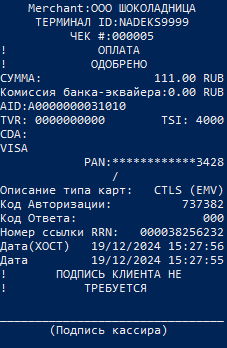
Transaction Sale
Input parameters | Result and return parameters |
|---|---|
MessageID=PUR | Approve=Y |
Transaction Return
Input parameters | Result and return parameters |
|---|---|
MessageID=REF | Approve=Y |
Transaction Void
Input Parameters | Result and return parameters |
|---|---|
MessageID=VOI | Approve=Y |
Transaction Reconcilation
Input Parameters | Result and return parameters |
|---|---|
MessageID=STL | Approve=Y |
Transaction Read Journal
Input Parameters | Result and return parameters |
|---|---|
Transaction Print Report
Input Parameters | Result and return parameters |
|---|---|
MessageID=SRV | Approve=Y |
Current links
Link to the current distribution of the DEMO library, 1C driver and emulator:
ASAPEcr 0.43 1.0.36 - Ссылка
The archive contains library files designed for different operating systems:
File name | OS |
|---|---|
asapecr.dll | Windows 32 |
asapecr_x64.dll | Windows 64 |
asapecr.so | Linux 64 |